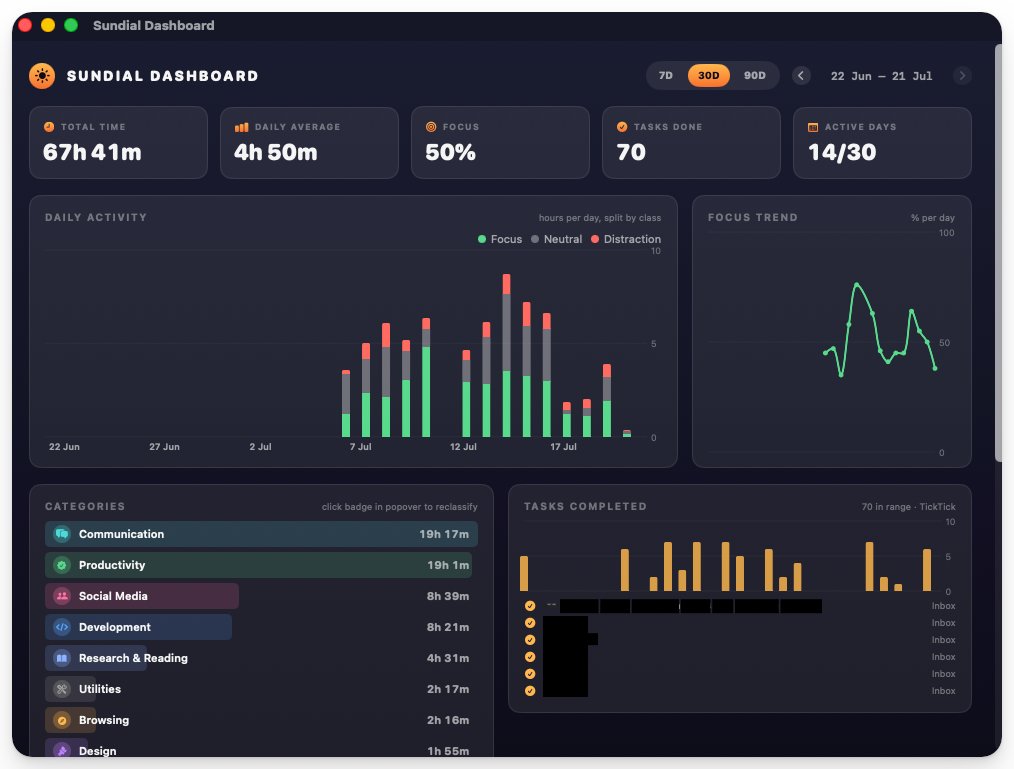
Ayush released a tiny Mac app called Sundial that logs every minute you spend on your Mac, automatically categorizing the apps and websites you use and correlating the data with your TickTick to‑do items. The app also generates AI‑powered insights about your work habits, and the first data set already shows a 5‑hour workday split roughly 50 % focused and 50 % on social or meeting tools. Ayush's tweet
How Sundial captures activity
Sundial runs as a background agent and records timestamps for each active window. It groups URLs (e.g., Claude, Discord, X, WhatsApp) and applications (Claude, Warp, TickTick) into categories like "focus" or "distraction" based on simple heuristics. The data is stored locally, which keeps the raw log out of the cloud but also means you must trust the app with detailed usage history.
AI‑generated habit insights
After a day of logging, Sundial surfaces patterns such as average work hours, focus session length, and the proportion of time spent on specific tools. The AI component suggests adjustments, for example, to batch meetings or limit social media windows. While the insights are interesting, they rely on the app's categorization logic and may produce false positives if you use a tool for both work and leisure.
Limits and trade‑offs
Sundial is macOS‑only, so teams with Windows or Linux laptops cannot adopt it without a parallel solution. Because the app stores data locally, exporting or sharing insights requires manual steps, which could hinder collaboration. The AI suggestions are lightweight and not a replacement for deeper analytics platforms; they work best for personal reflection rather than organizational reporting.
When to try it
If you already use TickTick and want a lightweight, self‑hosted way to surface personal productivity patterns, give Sundial a spin for a week and compare its AI hints against your own sense of focus. Watch for any privacy concerns around the local log and be ready to adjust the categorization rules if you notice mislabelled sessions.