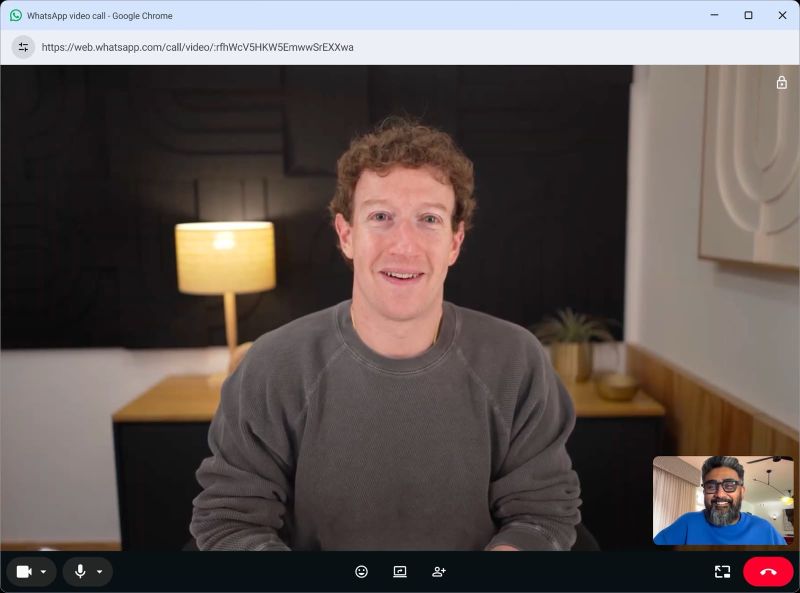
WhatsApp calls just landed in your browser. No app needed. No download. July 28, 2026 changed how you think about video calling.
Open web.whatsapp.com. Scan a QR code. Click the video icon. That's it—you're on a call. No Zoom link. No meeting codes. No authentication.
For anyone managing 47 Chrome tabs and bootstrapping a team in India, this matters.
Quick Start: How to Make Your First WhatsApp Web Call
- Go to web.whatsapp.com in any browser (Chrome, Firefox, Edge, Safari)
- On your phone, tap Settings → Linked Devices → Link a Device
- Scan the QR code shown on screen
- Open any chat, click the video or phone icon, grant camera/mic permission
- You're connected in seconds That's the real difference from Zoom: no setup friction.
What's New (4 Major Features)
Call Transfer — Move an active call between your phone and laptop without hanging up. Start on mobile, transfer to your laptop for a bigger screen, switch back when you leave. The call stays live.
Waiting Room — For group calls, enable "Require approval to join" and participants wait until you approve them. No unexpected guests on sensitive calls.
QuickHD — High-definition video in the first few seconds instead of blurry startup while your codec stabilizes.
Noise Suppression — Automatically filters background noise. Toggle on/off anytime. Works in loud environments (coffee shops, open offices, noisy homes).
These 4 features make WhatsApp genuinely competitive with Zoom for small teams.
When WhatsApp Web Calling Wins
1:1 calls — Zero friction. Already in the same chat thread as your messages. No separate link.
Team syncs under 8 people — Instant setup. Everyone's already on WhatsApp. No subscriptions. No separate tool.
Pair programming — You need 15 minutes to debug something. Screen share + talk. That's it. No formality.
Poor internet — WhatsApp's codec is optimized for exactly India's conditions: spotty 4G, variable latency. Your uncle's WiFi in Mumbai has better call quality on WhatsApp than Zoom. Proven.
Bootstrap budget — Free. No per-user cost. No annual subscriptions. Zoom Pro costs ₹1,350/month per person.
When Zoom Still Wins
Large group calls (15+ people) — Zoom handles this better. WhatsApp UI struggles.
Recording & compliance — Zoom records natively. Transcribes. Stores in the cloud. WhatsApp has zero native recording. For training, sales calls, legal protection? You need Zoom.
Admin dashboards — Zoom tracks who joined, duration, engagement. WhatsApp gives you nothing. Enterprise teams need this.
Formal presentations — Client calls, board meetings, investor pitches? Zoom feels more professional.
People without WhatsApp — International clients, older colleagues, some corporate networks. Zoom is the fallback.
The Honest Comparison
| Use Case | Zoom | Winner | |
|---|---|---|---|
| 1:1 quick call | ✅ Instant | Needs link | |
| Small team sync (5 people) | ✅ Zero friction | Overkill | |
| Recording meetings | ❌ Third-party only | ✅ Built-in | Zoom |
| Group calls 20+ people | ⚠️ UI clunky | ✅ Designed for this | Zoom |
| Cost for 5-person team | ✅ $0 | $75-100/year | |
| Poor internet reliability | ✅ Optimized codec | Works, struggles | |
| Admin controls | ❌ None | ✅ Full dashboards | Zoom |
The Real Takeaway
This isn't Zoom's 2020 moment. This is a feature that removes friction from what WhatsApp already does well.
Your advantage: WhatsApp's distribution is unbeatable. Literally everyone you want to call is already there. Zoom requires coordination.
The strategy: Use WhatsApp for everything under 8 people and internal calls. Zoom for recordings, formal meetings, and large groups. They complement each other.
For a solo developer or bootstrap team in India? You probably don't need Zoom's paid tier anymore. For a 20-person company? You'll eventually buy it.
That's not weakness for WhatsApp. That's clarity about what each tool does.
Ready to try it? Go to web.whatsapp.com and scan the QR code. Your first call works within minutes.
For more on remote work tools and bootstrap infrastructure, visit bitroot.org